• Steven Ponce
  • About
  • Data Visualizations
  • Projects
  • Resume
  • Email

On this page

  • Original
  • Makeover
  • Steps to Create this Graphic
    • 1. Load Packages & Setup
    • 2. Read in the Data
    • 3. Examine the Data
    • 4. Tidy Data
    • 5. Visualization Parameters
    • 6. Plot
    • 7. Save
    • 8. Session Info
    • 9. GitHub Repository
    • 10. References
    • 11. Custom Functions Documentation

April and November Expose the Clearest Capacity Strain

  • Show All Code
  • Hide All Code

  • View Source

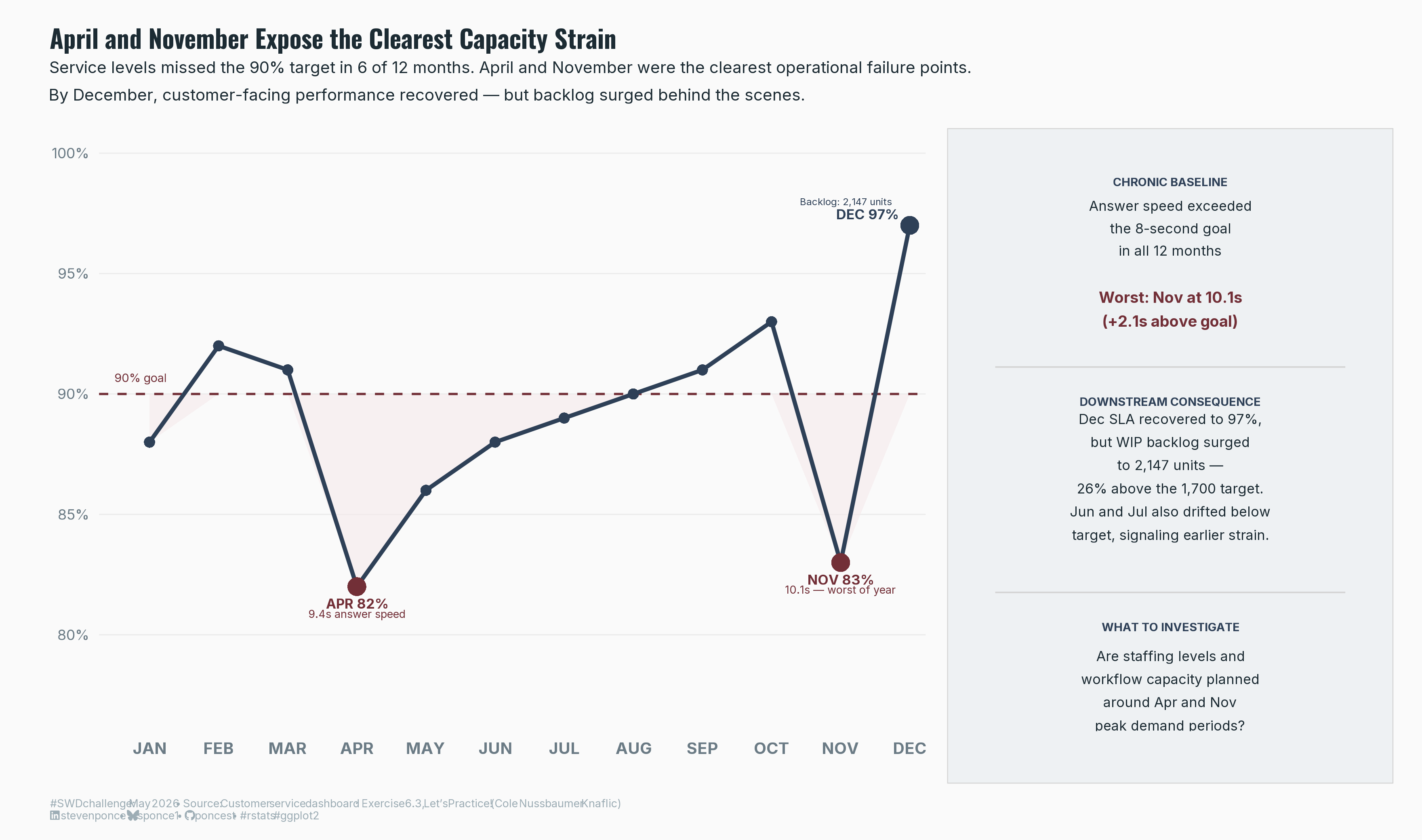
Service levels missed the 90% target in 6 of 12 months. April and November were the clearest operational failure points. By December, customer-facing performance recovered — but backlog surged behind the scenes.

SWDchallenge
Exercise
Data Visualization
R Programming
2026
A practice exercise from Let’s Practice! (Exercise 6.3) by Cole Nussbaumer Knaflic. Starting from a four-panel customer service dashboard, this submission identifies the key operational insight — service level failures cluster in April and November, with a hidden backlog consequence in December — and translates it into a single, decision-ready slide using a line chart with annotated failure points.
Author

Steven Ponce

Published

May 14, 2026

Original

Identify what matters most in a typical report and translate it into a clear, focused communication. In this exercise, you’ll move beyond exploration, extracting the key insights and explaining them in a way that is meaningful for your audience.
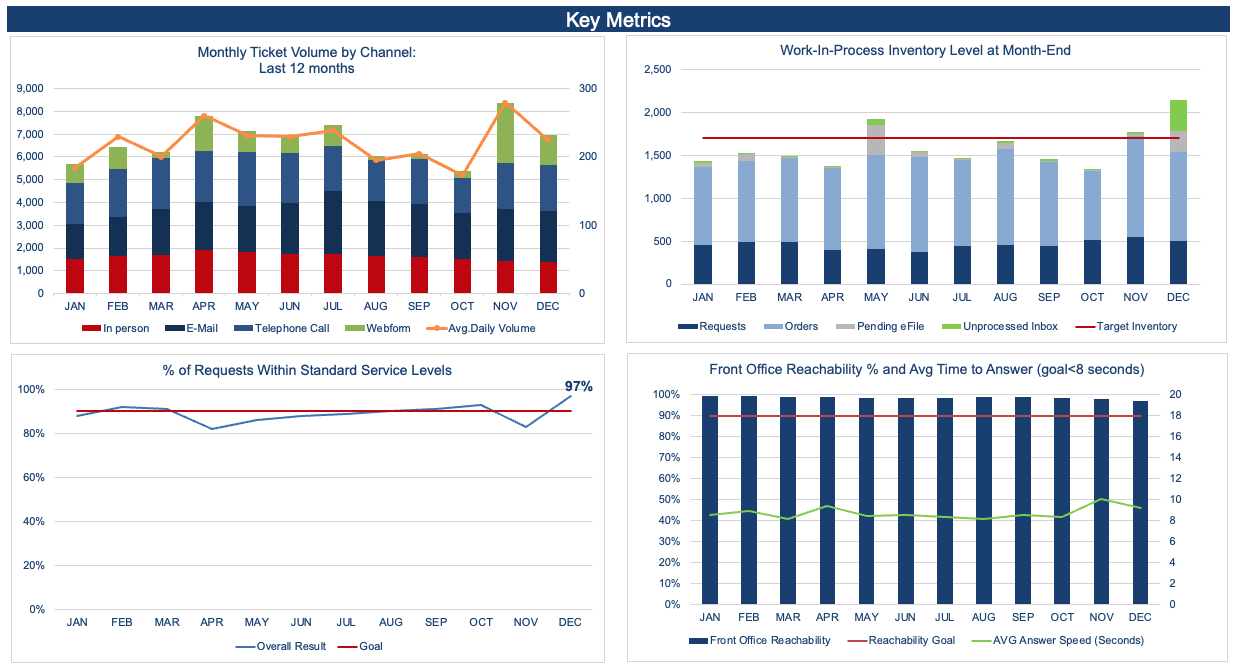
Figure 1: Original chart

Additional information can be found HERE

Makeover

Figure 2: A line chart showing the percentage of customer service requests fulfilled within standard service levels, January through December. A dashed burgundy reference line marks the 90% goal. A light blush ribbon shades the area below the goal, making missed periods immediately visible. The performance line in dark slate dips below 90% in six months. Two burgundy dots highlight the clearest failure points: April at 82% with an average answer speed of 9.4 seconds, and November at 83% with the year’s worst answer speed of 10.1 seconds. A dark slate dot marks December at 97%, where performance recovered; a label notes the WIP backlog reached 2,147 units that month. A right panel provides supporting diagnostics: answer speed exceeded the 8-second goal in all 12 months; December’s SLA recovery coincided with a backlog surge to 26% above the 1,700-unit target; and a closing question asks whether staffing levels and workflow capacity are planned around April and November peak demand periods.

Steps to Create this Graphic

1. Load Packages & Setup

Show code
```{r}
#| label: load

if (!require("pacman")) install.packages("pacman")
pacman::p_load(
  tidyverse, ggtext, showtext, janitor,     
  scales, glue, patchwork      
) 

### |- figure size ---- 
camcorder::gg_record( 
  dir    = here::here("temp_plots"), 
  device = "png",
  width  = 11,
  height = 6.5,
  units  = "in",
  dpi    = 320)

# Source utility functions
suppressMessages(source(here::here("R/utils/fonts.R")))
source(here::here("R/utils/social_icons.R"))
source(here::here("R/utils/image_utils.R"))
source(here::here("R/themes/base_theme.R"))
```

2. Read in the Data

Show code
```{r}
#| label: read

raw_data <- readxl::read_excel(
  here::here(
    "data/SWDchallenge/2026/EX063 - from dashboard to decision.xlsx"),
  sheet = "DATA", range = "B4:Q16", trim_ws = TRUE
)
```

3. Examine the Data

Show code
```{r}
#| label: examine
#| include: true
#| eval: true
#| results: 'hide'
#| warning: false

glimpse(raw_data)
```

4. Tidy Data

Show code
```{r}
#| label: tidy

df <- raw_data |>
  clean_names() |>
  mutate(
    month      = fct_inorder(month),
    month_num  = row_number(),

    # Hero metric: SLA vs goal
    sla        = overall_result,
    goal_sla   = goal,
    sla_miss   = sla < goal_sla,

    # Supporting: answer speed vs 8s goal
    speed      = avg_answer_speed_seconds,
    goal_speed = 8.0,
    speed_over = speed - goal_speed,

    # WIP: sum of all inventory components
    wip_total  = requests + orders + pending_e_file + unprocessed_inbox,
    wip_target = target_inventory
  )

# Annotation data
anno_pts <- tibble(
  month = factor(c("APR", "NOV", "DEC"), levels = levels(df$month)),
  month_num = c(4, 11, 12),
  sla = c(0.82, 0.83, 0.97)
)
```

5. Visualization Parameters

Show code
```{r}
#| label: params

### |-  plot aesthetics ----
colors <- get_theme_colors(
  palette = list(
    sla_line  = "#2E4057",   
    goal_line = "#722F37",  
    miss_fill = "#F5EAEB",   
    anno_fail = "#722F37",   
    anno_dec  = "#2E4057",   
    text_main = "#1C2B33",   
    text_sub  = "#6B7B85",   
    text_hero = "#2E4057",   
    bg        = "#FAFAFA"   
  )
)

col_sla_line <- colors$palette$sla_line
col_goal_line <- colors$palette$goal_line
col_miss_fill <- colors$palette$miss_fill
col_anno_nov <- colors$palette$anno_fail
col_anno_dec <- colors$palette$anno_dec
col_text_main <- colors$palette$text_main
col_text_sub <- colors$palette$text_sub
col_text_hero <- colors$palette$text_hero
col_bg <- colors$palette$bg

### |-  titles and caption ----
title_text <- "April and November Expose the Clearest Capacity Strain"

subtitle_text <- glue(
  "Service levels missed the 90% target in 6 of 12 months. ",
  "April and November were the clearest operational failure points.\n",
  "By December, customer-facing performance recovered \u2014 but backlog surged behind the scenes."
)

caption_text <- create_swd_caption(
  year = 2026,
  month = "May",
  source_text = "Customer service dashboard · Exercise 6.3, Let's Practice! (Cole Nussbaumer Knaflic)"
)

### |-  fonts ----
setup_fonts()
fonts <- get_font_families()

### |-  plot theme ----
base_theme <- create_base_theme(colors)

weekly_theme <- extend_weekly_theme(
  base_theme,
  theme(
    plot.background = element_rect(fill = col_bg, color = NA),
    panel.background = element_rect(fill = col_bg, color = NA),
    panel.grid.major.y = element_line(color = "gray92", linewidth = 0.3),
    panel.grid.major.x = element_blank(),
    panel.grid.minor = element_blank(),
    axis.ticks = element_blank(),
    axis.text.x = element_text(
      size = 9, color = col_text_sub, family = fonts$text, face = "bold"
    ),
    axis.text.y = element_text(
      size = 8, color = col_text_sub, family = fonts$text
    ),
    axis.title = element_blank(),
    plot.margin = margin(8, 12, 8, 12)
  )
)

theme_set(weekly_theme)
```

6. Plot

Show code
```{r}
#| label: plot

### |-  hero chart: SLA vs goal ----

p_sla <- df |>
  ggplot(aes(x = month_num, y = sla)) +

  # Geoms
  geom_ribbon(
    aes(ymin = pmin(sla, goal_sla), ymax = goal_sla),
    fill = col_miss_fill,
    alpha = 0.6
  ) +
  geom_hline(
    yintercept = 0.90,
    color = col_goal_line,
    linewidth  = 0.6,
    linetype = "dashed"
  ) +
  geom_line(
    color = col_sla_line,
    linewidth = 1.1
  ) +
  geom_point(
    color = col_sla_line,
    size  = 2.5,
    shape = 16
  ) +
  geom_point(
    data = anno_pts |> filter(month == "APR"),
    aes(x = month_num, y = sla),
    color = col_anno_nov, size = 4.5, shape = 16
  ) +
  geom_point(
    data = anno_pts |> filter(month == "NOV"),
    aes(x = month_num, y = sla),
    color = col_anno_nov, size = 4.5, shape = 16
  ) +
  geom_point(
    data = anno_pts |> filter(month == "DEC"),
    aes(x = month_num, y = sla),
    color = col_anno_dec, size = 4.5, shape = 16
  ) +
  # Annotate
  annotate("text",
    x = 4, y = 0.82,
    label = "9.4s answer speed",
    color = col_anno_nov, size = 2.1, vjust = 4.0, hjust = 0.5,
    family = fonts$text
  ) +
  annotate("text",
    x = 4, y = 0.82,
    label = "APR 82%",
    color = col_anno_nov, size = 2.7, vjust = 2.2, hjust = 0.5,
    fontface = "bold", family = fonts$text
  ) +
  annotate("text",
    x = 11, y = 0.83,
    label = "10.1s \u2014 worst of year",
    color = col_anno_nov, size = 2.1, vjust = 4.0, hjust = 0.5,
    family = fonts$text
  ) +
  annotate("text",
    x = 11, y = 0.83,
    label = "NOV 83%",
    color = col_anno_nov, size = 2.7, vjust = 2.2, hjust = 0.5,
    fontface = "bold", family = fonts$text
  ) +
  annotate("text",
    x = 12, y = 0.97,
    label = "DEC 97%",
    color = col_anno_dec, size = 2.7, vjust = -0.6, hjust = 1.2,
    fontface = "bold", family = fonts$text
  ) +
  annotate("text",
    x = 12, y = 0.972,
    label = "Backlog: 2,147 units",
    color = col_anno_dec, size = 1.9, vjust = -2.2, hjust = 1.2,
    family = fonts$text
  ) +
  annotate("text",
    x = 0.5, y = 0.905,
    label = "90% goal", color = col_goal_line,
    size = 2.3, hjust = 0, vjust = 0,
    family = fonts$text
  ) +
  # Scales
  scale_x_continuous(
    breaks = 1:12,
    labels = c(
      "JAN", "FEB", "MAR", "APR", "MAY", "JUN",
      "JUL", "AUG", "SEP", "OCT", "NOV", "DEC"
    ),
    expand = c(0.02, 0)
  ) +
  scale_y_continuous(
    limits = c(0.76, 1.00),
    breaks = c(0.80, 0.85, 0.90, 0.95, 1.00),
    labels = percent_format(accuracy = 1),
    expand = c(0, 0)
  ) +
  coord_cartesian(clip = "off")


### |-  right diagnostic panel ----

right_df <- tibble(x = 0.5, y = 0.5)

p_right <- ggplot(right_df, aes(x, y)) +

  # Geoms
  geom_text(aes(x = 0.5, y = 0.95),
    label = "CHRONIC BASELINE", color = col_text_hero,
    size = 2.3, hjust = 0.5, fontface = "bold",
    family = fonts$text, inherit.aes = FALSE
  ) +
  geom_text(aes(x = 0.5, y = 0.87),
    label = "Answer speed exceeded\nthe 8-second goal\nin all 12 months",
    color = col_text_main, size = 2.7, hjust = 0.5,
    lineheight = 1.35, family = fonts$text, inherit.aes = FALSE
  ) +
  geom_text(aes(x = 0.5, y = 0.73),
    label = "Worst: Nov at 10.1s\n(+2.1s above goal)",
    color = col_anno_nov, size = 3.0, hjust = 0.5,
    fontface = "bold", lineheight = 1.3,
    family = fonts$text, inherit.aes = FALSE
  ) +
  annotate("segment",
    x = 0.05, xend = 0.95, y = 0.63, yend = 0.63,
    color = "gray83", linewidth = 0.4
  ) +

  # DOWNSTREAM CONSEQUENCE
  geom_text(aes(x = 0.5, y = 0.57),
    label = "DOWNSTREAM CONSEQUENCE", color = col_text_hero,
    size = 2.3, hjust = 0.5, fontface = "bold",
    family = fonts$text, inherit.aes = FALSE
  ) +
  geom_text(aes(x = 0.5, y = 0.44),
    label = "Dec SLA recovered to 97%,\nbut WIP backlog surged\nto 2,147 units \u2014\n26% above the 1,700 target.\nJun and Jul also drifted below\ntarget, signaling earlier strain.",
    color = col_text_main, size = 2.7, hjust = 0.5,
    lineheight = 1.4, family = fonts$text, inherit.aes = FALSE
  ) +
  annotate("segment",
    x = 0.05, xend = 0.95, y = 0.24, yend = 0.24,
    color = "gray83", linewidth = 0.4
  ) +

  #  WHAT TO INVESTIGATE
  geom_text(aes(x = 0.5, y = 0.18),
    label = "WHAT TO INVESTIGATE", color = col_text_hero,
    size = 2.3, hjust = 0.5, fontface = "bold",
    family = fonts$text, inherit.aes = FALSE
  ) +
  geom_text(aes(x = 0.5, y = 0.07),
    label = "Are staffing levels and\nworkflow capacity planned\naround Apr and Nov\npeak demand periods?",
    color = col_text_main, size = 2.7, hjust = 0.5,
    lineheight = 1.4, family = fonts$text, inherit.aes = FALSE
  ) +

  # Scales
  scale_x_continuous(limits = c(0, 1), expand = c(0, 0)) +
  scale_y_continuous(limits = c(0, 1), expand = c(0, 0)) +

  # Theme
  theme_bw() +
  theme(
    plot.background  = element_rect(fill = "#EEF1F3", color = "gray83", linewidth = 0.5),
    panel.background = element_rect(fill = "#EEF1F3", color = NA),
    panel.border = element_blank(),
    panel.grid = element_blank(),
    axis.text = element_blank(),
    axis.ticks = element_blank(),
    axis.title = element_blank(),
    plot.margin = margin(14, 16, 14, 16)
  )


### |-  combined plots ----
p_slide <- p_sla + p_right +
  plot_layout(widths = c(0.68, 0.32)) +
  plot_annotation(
    title = title_text,
    subtitle = subtitle_text,
    caption = caption_text,
    theme = theme(
      plot.title = element_text(
        size = 14, face = "bold", color = col_text_main,
        family = fonts$title, margin = margin(b = 4)
      ),
      plot.subtitle = element_text(
        size = 9, color = col_text_main, family = fonts$text,
        lineheight = 1.4, margin = margin(b = 14)
      ),
      plot.caption = element_markdown(
        size = 6, color = "#9DADB5", family = fonts$text,
        hjust = 0, margin = margin(t = 8)
      ),
      plot.background = element_rect(fill = col_bg, color = NA),
      plot.margin = margin(16, 16, 10, 16)
    )
  )
```

7. Save

Show code
```{r}
#| label: save

### |-  plot image ----  
save_plot_patchwork(
  p_slide, 
  type = 'swd', 
  year = 2026, 
  month = 05, 
  exercise = 063,
  width = 11, 
  height = 6.5
  )
```

8. Session Info

TipExpand for Session Info
R version 4.5.3 (2026-03-11 ucrt)
Platform: x86_64-w64-mingw32/x64
Running under: Windows 11 x64 (build 26100)

Matrix products: default
  LAPACK version 3.12.1

locale:
[1] LC_COLLATE=English_United States.utf8 
[2] LC_CTYPE=English_United States.utf8   
[3] LC_MONETARY=English_United States.utf8
[4] LC_NUMERIC=C                          
[5] LC_TIME=English_United States.utf8    

time zone: America/New_York
tzcode source: internal

attached base packages:
[1] stats     graphics  grDevices utils     datasets  methods   base     

other attached packages:
 [1] here_1.0.2      patchwork_1.3.2 glue_1.8.0      scales_1.4.0   
 [5] janitor_2.2.1   showtext_0.9-8  showtextdb_3.0  sysfonts_0.8.9 
 [9] ggtext_0.1.2    lubridate_1.9.5 forcats_1.0.1   stringr_1.6.0  
[13] dplyr_1.2.1     purrr_1.2.2     readr_2.2.0     tidyr_1.3.2    
[17] tibble_3.3.1    ggplot2_4.0.3   tidyverse_2.0.0 pacman_0.5.1   

loaded via a namespace (and not attached):
 [1] gtable_0.3.6       xfun_0.57          htmlwidgets_1.6.4  tzdb_0.5.0        
 [5] vctrs_0.7.3        tools_4.5.3        generics_0.1.4     yulab.utils_0.2.4 
 [9] curl_7.0.0         pkgconfig_2.0.3    ggplotify_0.1.3    RColorBrewer_1.1-3
[13] S7_0.2.1           readxl_1.4.5       rematch_2.0.0      lifecycle_1.0.5   
[17] compiler_4.5.3     farver_2.1.2       codetools_0.2-20   snakecase_0.11.1  
[21] litedown_0.9       htmltools_0.5.9    yaml_2.3.12        pillar_1.11.1     
[25] magick_2.9.1       commonmark_2.0.0   tidyselect_1.2.1   digest_0.6.39     
[29] stringi_1.8.7      labeling_0.4.3     rprojroot_2.1.1    fastmap_1.2.0     
[33] grid_4.5.3         cli_3.6.6          magrittr_2.0.5     withr_3.0.2       
[37] rappdirs_0.3.4     timechange_0.4.0   rmarkdown_2.31     otel_0.2.0        
[41] cellranger_1.1.0   hms_1.1.4          evaluate_1.0.5     knitr_1.51        
[45] markdown_2.0       gridGraphics_0.5-1 rlang_1.2.0        gridtext_0.1.6    
[49] Rcpp_1.1.1         xml2_1.5.2         rstudioapi_0.18.0  jsonlite_2.0.0    
[53] R6_2.6.1           fs_2.0.1          

9. GitHub Repository

TipExpand for GitHub Repo

The complete code for this analysis is available in swd_2025_05 - Ex_058.qmd. For the full repository, click here.

10. References

TipExpand for References
  1. Data Sources:
    • Storytelling with Data Exercise | Move from Dashboard to Decision: Download the data
  2. Exercise Reference:
    • Knaflic, Cole Nussbaumer. Let’s Practice! Exercise 6.3. storytellingwithdata.com

11. Custom Functions Documentation

Note📦 Custom Helper Functions

This analysis uses custom functions from my personal module library for efficiency and consistency across projects.

Functions Used:

  • fonts.R: setup_fonts(), get_font_families() - Font management with showtext
  • social_icons.R: create_social_caption() - Generates formatted social media captions
  • image_utils.R: save_plot() - Consistent plot saving with naming conventions
  • base_theme.R: create_base_theme(), extend_weekly_theme(), get_theme_colors() - Custom ggplot2 themes

Why custom functions?
These utilities standardize theming, fonts, and output across all my data visualizations. The core analysis (data tidying and visualization logic) uses only standard tidyverse packages.

Source Code:
View all custom functions → GitHub: R/utils

Back to top

Citation

BibTeX citation:
@online{ponce2026,
  author = {Ponce, Steven},
  title = {April and {November} {Expose} the {Clearest} {Capacity}
    {Strain}},
  date = {2026-05-14},
  url = {https://stevenponce.netlify.app/data_visualizations/SWD%20Challenge/2026/swd_2026_05-Ex_063.html},
  langid = {en}
}
For attribution, please cite this work as:
Ponce, Steven. 2026. “April and November Expose the Clearest Capacity Strain.” May 14. https://stevenponce.netlify.app/data_visualizations/SWD%20Challenge/2026/swd_2026_05-Ex_063.html.
Source Code
---
title: "April and November Expose the Clearest Capacity Strain"
subtitle: "Service levels missed the 90% target in 6 of 12 months. April and November were the clearest operational failure points. By December, customer-facing performance recovered — but backlog surged behind the scenes."
description: "A practice exercise from *Let's Practice!* (Exercise 6.3) by Cole Nussbaumer Knaflic. Starting from a four-panel customer service dashboard, this submission identifies the key operational insight — service level failures cluster in April and November, with a hidden backlog consequence in December — and translates it into a single, decision-ready slide using a line chart with annotated failure points."
date: "2026-05-14"
author:
  - name: "Steven Ponce"
    url: "https://stevenponce.netlify.app"
citation:
  url: "https://stevenponce.netlify.app/data_visualizations/SWD%20Challenge/2026/swd_2026_05-Ex_063.html"
categories: ["SWDchallenge", "Exercise", "Data Visualization", "R Programming", "2026"]
tags: [
  "line-chart",
  "dashboard-to-decision",
  "service-levels",
  "annotation",
  "operational-analytics",
  "customer-service",
  "burgundy-palette",
  "patchwork",
  "ggplot2",
  "exercise"
]
image: "thumbnails/swd_2026_05-Ex_063.png"
format:
  html:
    toc: true
    toc-depth: 5
    code-link: true
    code-fold: true
    code-tools: true
    code-summary: "Show code"
    self-contained: true
editor_options:
  chunk_output_type: inline
execute:
  freeze: true
  cache: true
  error: false
  message: false
  warning: false
  eval: true
---

### Original

Identify what matters most in a typical report and translate it into a clear, focused communication. In this exercise, you’ll move beyond exploration, extracting the key insights and explaining them in a way that is meaningful for your audience.

![Original chart](https://stwd-prod-static-back.s3.amazonaws.com/media/Original_Dashboard.png){#fig-1}

Additional information can be found [HERE](https://community.storytellingwithdata.com/exercises/move-from-dashboard-to-decision)

### Makeover
![A line chart showing the percentage of customer service requests fulfilled within standard service levels, January through December. A dashed burgundy reference line marks the 90% goal. A light blush ribbon shades the area below the goal, making missed periods immediately visible. The performance line in dark slate dips below 90% in six months. Two burgundy dots highlight the clearest failure points: April at 82% with an average answer speed of 9.4 seconds, and November at 83% with the year's worst answer speed of 10.1 seconds. A dark slate dot marks December at 97%, where performance recovered; a label notes the WIP backlog reached 2,147 units that month. A right panel provides supporting diagnostics: answer speed exceeded the 8-second goal in all 12 months; December's SLA recovery coincided with a backlog surge to 26% above the 1,700-unit target; and a closing question asks whether staffing levels and workflow capacity are planned around April and November peak demand periods.](swd_2026_05-Ex_0063.png){#fig-2}

### [**Steps to Create this Graphic**]{.mark}

#### [1. Load Packages & Setup]{.smallcaps}

```{r}
#| label: load

if (!require("pacman")) install.packages("pacman")
pacman::p_load(
  tidyverse, ggtext, showtext, janitor,     
  scales, glue, patchwork      
) 

### |- figure size ---- 
camcorder::gg_record( 
  dir    = here::here("temp_plots"), 
  device = "png",
  width  = 11,
  height = 6.5,
  units  = "in",
  dpi    = 320)

# Source utility functions
suppressMessages(source(here::here("R/utils/fonts.R")))
source(here::here("R/utils/social_icons.R"))
source(here::here("R/utils/image_utils.R"))
source(here::here("R/themes/base_theme.R"))
```

#### [2. Read in the Data]{.smallcaps}

```{r}
#| label: read

raw_data <- readxl::read_excel(
  here::here(
    "data/SWDchallenge/2026/EX063 - from dashboard to decision.xlsx"),
  sheet = "DATA", range = "B4:Q16", trim_ws = TRUE
)

```

#### [3. Examine the Data]{.smallcaps}

```{r}
#| label: examine
#| include: true
#| eval: true
#| results: 'hide'
#| warning: false

glimpse(raw_data)
```

#### [4. Tidy Data]{.smallcaps}

```{r}
#| label: tidy

df <- raw_data |>
  clean_names() |>
  mutate(
    month      = fct_inorder(month),
    month_num  = row_number(),

    # Hero metric: SLA vs goal
    sla        = overall_result,
    goal_sla   = goal,
    sla_miss   = sla < goal_sla,

    # Supporting: answer speed vs 8s goal
    speed      = avg_answer_speed_seconds,
    goal_speed = 8.0,
    speed_over = speed - goal_speed,

    # WIP: sum of all inventory components
    wip_total  = requests + orders + pending_e_file + unprocessed_inbox,
    wip_target = target_inventory
  )

# Annotation data
anno_pts <- tibble(
  month = factor(c("APR", "NOV", "DEC"), levels = levels(df$month)),
  month_num = c(4, 11, 12),
  sla = c(0.82, 0.83, 0.97)
)
```

#### [5. Visualization Parameters]{.smallcaps}

```{r}
#| label: params

### |-  plot aesthetics ----
colors <- get_theme_colors(
  palette = list(
    sla_line  = "#2E4057",   
    goal_line = "#722F37",  
    miss_fill = "#F5EAEB",   
    anno_fail = "#722F37",   
    anno_dec  = "#2E4057",   
    text_main = "#1C2B33",   
    text_sub  = "#6B7B85",   
    text_hero = "#2E4057",   
    bg        = "#FAFAFA"   
  )
)

col_sla_line <- colors$palette$sla_line
col_goal_line <- colors$palette$goal_line
col_miss_fill <- colors$palette$miss_fill
col_anno_nov <- colors$palette$anno_fail
col_anno_dec <- colors$palette$anno_dec
col_text_main <- colors$palette$text_main
col_text_sub <- colors$palette$text_sub
col_text_hero <- colors$palette$text_hero
col_bg <- colors$palette$bg

### |-  titles and caption ----
title_text <- "April and November Expose the Clearest Capacity Strain"

subtitle_text <- glue(
  "Service levels missed the 90% target in 6 of 12 months. ",
  "April and November were the clearest operational failure points.\n",
  "By December, customer-facing performance recovered \u2014 but backlog surged behind the scenes."
)

caption_text <- create_swd_caption(
  year = 2026,
  month = "May",
  source_text = "Customer service dashboard · Exercise 6.3, Let's Practice! (Cole Nussbaumer Knaflic)"
)

### |-  fonts ----
setup_fonts()
fonts <- get_font_families()

### |-  plot theme ----
base_theme <- create_base_theme(colors)

weekly_theme <- extend_weekly_theme(
  base_theme,
  theme(
    plot.background = element_rect(fill = col_bg, color = NA),
    panel.background = element_rect(fill = col_bg, color = NA),
    panel.grid.major.y = element_line(color = "gray92", linewidth = 0.3),
    panel.grid.major.x = element_blank(),
    panel.grid.minor = element_blank(),
    axis.ticks = element_blank(),
    axis.text.x = element_text(
      size = 9, color = col_text_sub, family = fonts$text, face = "bold"
    ),
    axis.text.y = element_text(
      size = 8, color = col_text_sub, family = fonts$text
    ),
    axis.title = element_blank(),
    plot.margin = margin(8, 12, 8, 12)
  )
)

theme_set(weekly_theme)

```

#### [6. Plot]{.smallcaps}

```{r}
#| label: plot

### |-  hero chart: SLA vs goal ----

p_sla <- df |>
  ggplot(aes(x = month_num, y = sla)) +

  # Geoms
  geom_ribbon(
    aes(ymin = pmin(sla, goal_sla), ymax = goal_sla),
    fill = col_miss_fill,
    alpha = 0.6
  ) +
  geom_hline(
    yintercept = 0.90,
    color = col_goal_line,
    linewidth  = 0.6,
    linetype = "dashed"
  ) +
  geom_line(
    color = col_sla_line,
    linewidth = 1.1
  ) +
  geom_point(
    color = col_sla_line,
    size  = 2.5,
    shape = 16
  ) +
  geom_point(
    data = anno_pts |> filter(month == "APR"),
    aes(x = month_num, y = sla),
    color = col_anno_nov, size = 4.5, shape = 16
  ) +
  geom_point(
    data = anno_pts |> filter(month == "NOV"),
    aes(x = month_num, y = sla),
    color = col_anno_nov, size = 4.5, shape = 16
  ) +
  geom_point(
    data = anno_pts |> filter(month == "DEC"),
    aes(x = month_num, y = sla),
    color = col_anno_dec, size = 4.5, shape = 16
  ) +
  # Annotate
  annotate("text",
    x = 4, y = 0.82,
    label = "9.4s answer speed",
    color = col_anno_nov, size = 2.1, vjust = 4.0, hjust = 0.5,
    family = fonts$text
  ) +
  annotate("text",
    x = 4, y = 0.82,
    label = "APR 82%",
    color = col_anno_nov, size = 2.7, vjust = 2.2, hjust = 0.5,
    fontface = "bold", family = fonts$text
  ) +
  annotate("text",
    x = 11, y = 0.83,
    label = "10.1s \u2014 worst of year",
    color = col_anno_nov, size = 2.1, vjust = 4.0, hjust = 0.5,
    family = fonts$text
  ) +
  annotate("text",
    x = 11, y = 0.83,
    label = "NOV 83%",
    color = col_anno_nov, size = 2.7, vjust = 2.2, hjust = 0.5,
    fontface = "bold", family = fonts$text
  ) +
  annotate("text",
    x = 12, y = 0.97,
    label = "DEC 97%",
    color = col_anno_dec, size = 2.7, vjust = -0.6, hjust = 1.2,
    fontface = "bold", family = fonts$text
  ) +
  annotate("text",
    x = 12, y = 0.972,
    label = "Backlog: 2,147 units",
    color = col_anno_dec, size = 1.9, vjust = -2.2, hjust = 1.2,
    family = fonts$text
  ) +
  annotate("text",
    x = 0.5, y = 0.905,
    label = "90% goal", color = col_goal_line,
    size = 2.3, hjust = 0, vjust = 0,
    family = fonts$text
  ) +
  # Scales
  scale_x_continuous(
    breaks = 1:12,
    labels = c(
      "JAN", "FEB", "MAR", "APR", "MAY", "JUN",
      "JUL", "AUG", "SEP", "OCT", "NOV", "DEC"
    ),
    expand = c(0.02, 0)
  ) +
  scale_y_continuous(
    limits = c(0.76, 1.00),
    breaks = c(0.80, 0.85, 0.90, 0.95, 1.00),
    labels = percent_format(accuracy = 1),
    expand = c(0, 0)
  ) +
  coord_cartesian(clip = "off")


### |-  right diagnostic panel ----

right_df <- tibble(x = 0.5, y = 0.5)

p_right <- ggplot(right_df, aes(x, y)) +

  # Geoms
  geom_text(aes(x = 0.5, y = 0.95),
    label = "CHRONIC BASELINE", color = col_text_hero,
    size = 2.3, hjust = 0.5, fontface = "bold",
    family = fonts$text, inherit.aes = FALSE
  ) +
  geom_text(aes(x = 0.5, y = 0.87),
    label = "Answer speed exceeded\nthe 8-second goal\nin all 12 months",
    color = col_text_main, size = 2.7, hjust = 0.5,
    lineheight = 1.35, family = fonts$text, inherit.aes = FALSE
  ) +
  geom_text(aes(x = 0.5, y = 0.73),
    label = "Worst: Nov at 10.1s\n(+2.1s above goal)",
    color = col_anno_nov, size = 3.0, hjust = 0.5,
    fontface = "bold", lineheight = 1.3,
    family = fonts$text, inherit.aes = FALSE
  ) +
  annotate("segment",
    x = 0.05, xend = 0.95, y = 0.63, yend = 0.63,
    color = "gray83", linewidth = 0.4
  ) +

  # DOWNSTREAM CONSEQUENCE
  geom_text(aes(x = 0.5, y = 0.57),
    label = "DOWNSTREAM CONSEQUENCE", color = col_text_hero,
    size = 2.3, hjust = 0.5, fontface = "bold",
    family = fonts$text, inherit.aes = FALSE
  ) +
  geom_text(aes(x = 0.5, y = 0.44),
    label = "Dec SLA recovered to 97%,\nbut WIP backlog surged\nto 2,147 units \u2014\n26% above the 1,700 target.\nJun and Jul also drifted below\ntarget, signaling earlier strain.",
    color = col_text_main, size = 2.7, hjust = 0.5,
    lineheight = 1.4, family = fonts$text, inherit.aes = FALSE
  ) +
  annotate("segment",
    x = 0.05, xend = 0.95, y = 0.24, yend = 0.24,
    color = "gray83", linewidth = 0.4
  ) +

  #  WHAT TO INVESTIGATE
  geom_text(aes(x = 0.5, y = 0.18),
    label = "WHAT TO INVESTIGATE", color = col_text_hero,
    size = 2.3, hjust = 0.5, fontface = "bold",
    family = fonts$text, inherit.aes = FALSE
  ) +
  geom_text(aes(x = 0.5, y = 0.07),
    label = "Are staffing levels and\nworkflow capacity planned\naround Apr and Nov\npeak demand periods?",
    color = col_text_main, size = 2.7, hjust = 0.5,
    lineheight = 1.4, family = fonts$text, inherit.aes = FALSE
  ) +

  # Scales
  scale_x_continuous(limits = c(0, 1), expand = c(0, 0)) +
  scale_y_continuous(limits = c(0, 1), expand = c(0, 0)) +

  # Theme
  theme_bw() +
  theme(
    plot.background  = element_rect(fill = "#EEF1F3", color = "gray83", linewidth = 0.5),
    panel.background = element_rect(fill = "#EEF1F3", color = NA),
    panel.border = element_blank(),
    panel.grid = element_blank(),
    axis.text = element_blank(),
    axis.ticks = element_blank(),
    axis.title = element_blank(),
    plot.margin = margin(14, 16, 14, 16)
  )


### |-  combined plots ----
p_slide <- p_sla + p_right +
  plot_layout(widths = c(0.68, 0.32)) +
  plot_annotation(
    title = title_text,
    subtitle = subtitle_text,
    caption = caption_text,
    theme = theme(
      plot.title = element_text(
        size = 14, face = "bold", color = col_text_main,
        family = fonts$title, margin = margin(b = 4)
      ),
      plot.subtitle = element_text(
        size = 9, color = col_text_main, family = fonts$text,
        lineheight = 1.4, margin = margin(b = 14)
      ),
      plot.caption = element_markdown(
        size = 6, color = "#9DADB5", family = fonts$text,
        hjust = 0, margin = margin(t = 8)
      ),
      plot.background = element_rect(fill = col_bg, color = NA),
      plot.margin = margin(16, 16, 10, 16)
    )
  )

```

#### [7. Save]{.smallcaps}

```{r}
#| label: save

### |-  plot image ----  
save_plot_patchwork(
  p_slide, 
  type = 'swd', 
  year = 2026, 
  month = 05, 
  exercise = 063,
  width = 11, 
  height = 6.5
  )
```

#### [8. Session Info]{.smallcaps}

::: {.callout-tip collapse="true"}
##### Expand for Session Info

```{r, echo = FALSE}
#| eval: true
#| warning: false

sessionInfo()
```
:::

#### [9. GitHub Repository]{.smallcaps}

::: {.callout-tip collapse="true"}
##### Expand for GitHub Repo

The complete code for this analysis is available in [`swd_2025_05 - Ex_058.qmd`](https://github.com/poncest/personal-website/tree/master/data_visualizations/SWD%20Challenge/2025/swd_2025_05-Ex_058.qmd). For the full repository, [click here](https://github.com/poncest/personal-website/).
:::


#### [10. References]{.smallcaps}
::: {.callout-tip collapse="true"}
##### Expand for References

1.  Data Sources:
    -   Storytelling with Data Exercise | Move from Dashboard to Decision: [Download the data](https://docs.google.com/spreadsheets/d/1zEes0KGHEP1sJfIHgAT2FFzpFMCp0i6e/edit?usp=drive_link&ouid=101369070286981421257&rtpof=true&sd=true)

2.  Exercise Reference:
    -   Knaflic, Cole Nussbaumer. *Let's Practice!* Exercise 6.3. [storytellingwithdata.com](https://community.storytellingwithdata.com/exercises/move-from-dashboard-to-decision)

:::


#### [11. Custom Functions Documentation]{.smallcaps}

::: {.callout-note collapse="true"}
##### 📦 Custom Helper Functions

This analysis uses custom functions from my personal module library for efficiency and consistency across projects.

**Functions Used:**

-   **`fonts.R`**: `setup_fonts()`, `get_font_families()` - Font management with showtext
-   **`social_icons.R`**: `create_social_caption()` - Generates formatted social media captions
-   **`image_utils.R`**: `save_plot()` - Consistent plot saving with naming conventions
-   **`base_theme.R`**: `create_base_theme()`, `extend_weekly_theme()`, `get_theme_colors()` - Custom ggplot2 themes

**Why custom functions?**\
These utilities standardize theming, fonts, and output across all my data visualizations. The core analysis (data tidying and visualization logic) uses only standard tidyverse packages.

**Source Code:**\
View all custom functions → [GitHub: R/utils](https://github.com/poncest/personal-website/tree/master/R)
:::


© 2024 Steven Ponce

Source Issues